 Games
Games
About this tool
The first time you open it, it lists the three steps. You can try it with a sample class before you paste your own.
Paste each class list in, straight from a spreadsheet or your roll. "Smith, Anna" becomes Anna Smith, and numbers and email addresses are left out. You can paste all your classes at once if each one has a heading like "Period 1".
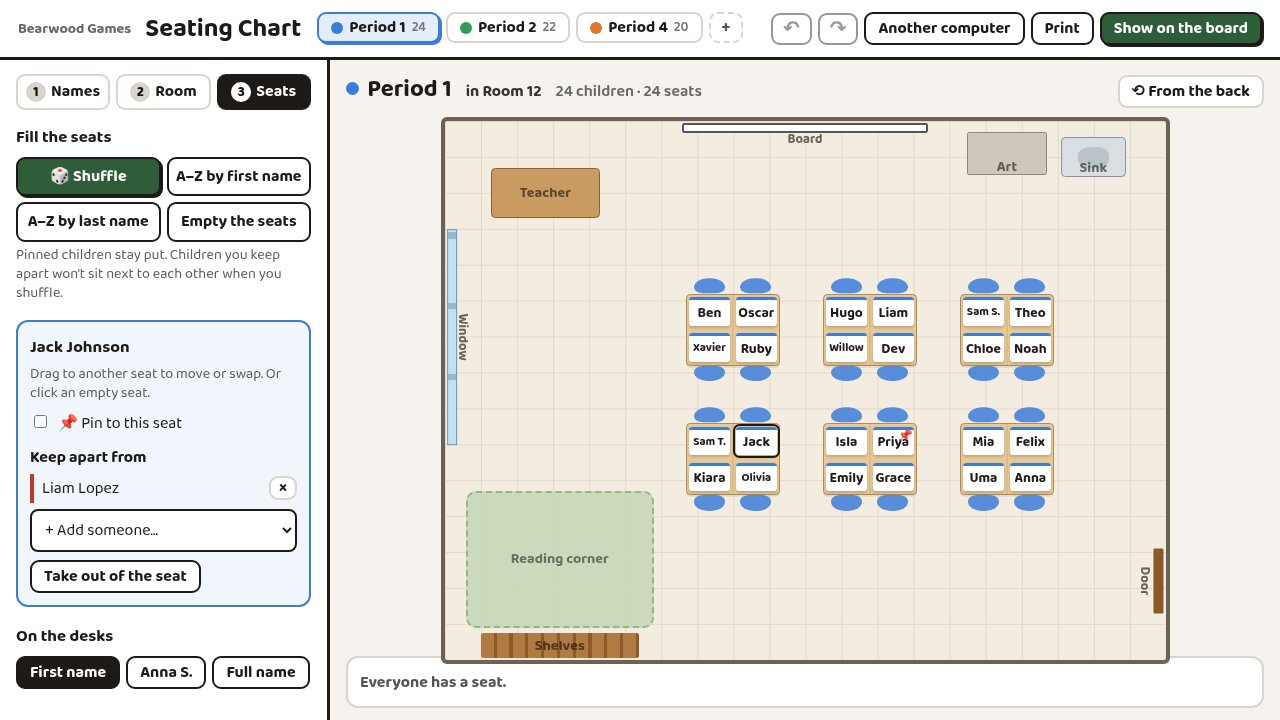
Then draw the room. Pick rows, pairs, groups of 4 or 6, a horseshoe or exam spacing, and the desks are laid out for the size of your class. Move anything by dragging it. Add the board, doors, windows, shelves, a carpet, a sink, a teacher's desk or your own labels.
If you teach in more than one room, add each one and say which room each class is in. Classes in the same room share its furniture but keep their own seats. A class that moves to another room keeps its order, front row first.
To seat the class, drag names onto desks. Dropping a name on someone else's desk swaps the two. Shuffle puts everyone in a random seat, and A to Z sorts them from the front row back. Pin a child to their seat and shuffling leaves them there. Mark two children who shouldn't sit together, and shuffling keeps them apart. If they end up next to each other anyway, both names turn red.
On the board and on paper
- Show on the board fills the screen with the plan and big names. Reveal the seats brings the names in through the door one at a time, front row first.
- Turn round flips the plan so the board is at the bottom, the way you see the room from the front.
- Print one class or all of them, a page each, with an A to Z list and tick boxes for a relief teacher.
Moving it to the board computer
Your chart is kept in the browser on that computer. To use it on another one, copy a link and email it to yourself, or save it to a file. The names are inside the link itself and aren't sent to us.
Good for
- The first day with a new class
- A new seating plan each term, without starting again
- A timetable split between your classroom and a lab
- Splitting up two children who talk
- Leaving a plan for a relief teacher