 Games
About this tool
There are four parts, picked along the top.
Build a number
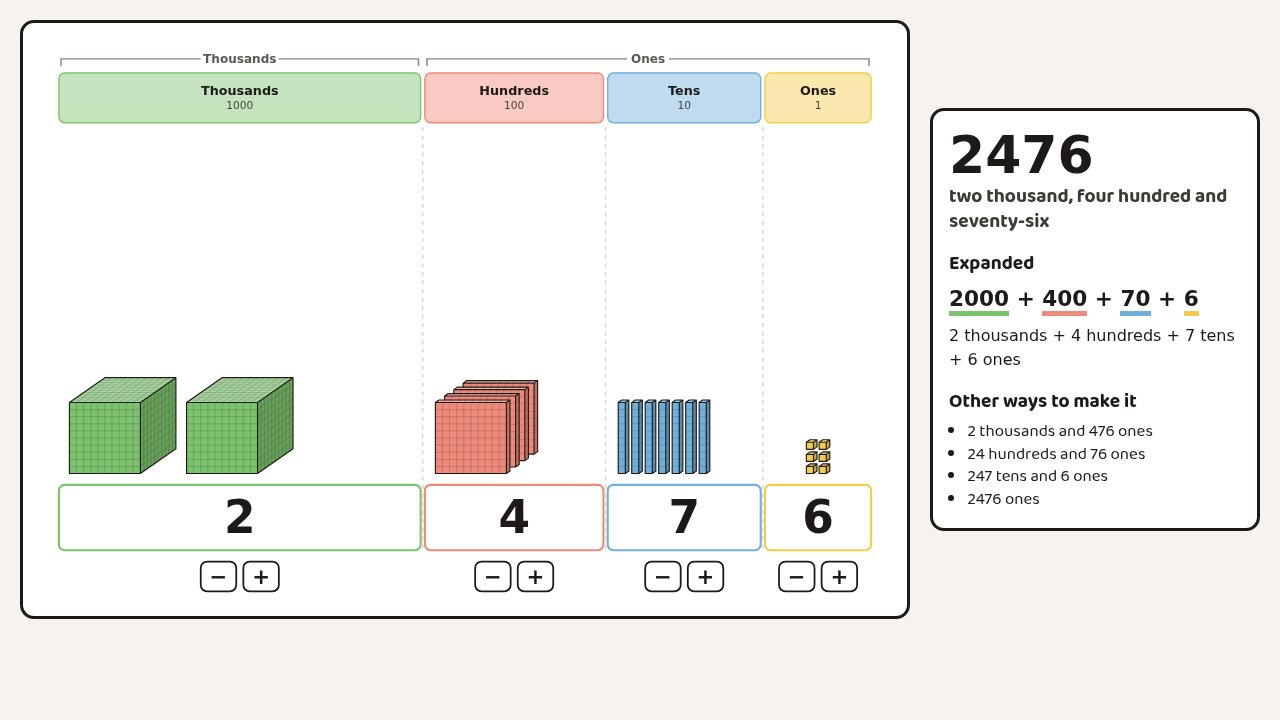
Each place has a column, with its digit underneath. Press + and − to add or take away blocks, or type a number to make it. Beside the chart is the number in words, its expanded form (2000 + 400 + 70 + 6) and other ways to make it, such as 24 hundreds and 76 ones.
The blocks are drawn to scale. A long is ten small cubes, a flat is ten longs and the thousand cube is ten flats. When a column gets to 10, the digit turns red and a Trade button appears. Press it and the ten blocks push together into one block, which moves into the next column. Click a block and it breaks into ten of the place to its right, ready for taking away.
Blocks go up to thousands. For bigger numbers and decimals, switch to discs: one coloured disc for each 1, 10, 100 and so on, up to millions and down to thousandths.
Untick Show the number and the digits, words and expanded form become blank lines, so the class can work out the number from the blocks.
Break it down
Type a number up to 10 000. It starts as that many small cubes. Press Group and every 10 small cubes push together into a long, then every 10 longs into a flat, and so on, until the number is made of the biggest blocks it can be. Leftovers wait to the right, so 3425 goes from 3425 ones to 342 tens and 5 ones, then 34 hundreds, 2 tens and 5 ones. Press Break up to go back down, a step at a time or all the way.
The sum along the top changes with each step, and the steps are listed beside the picture. The number never changes, only the blocks.
Ten make one
One small cube. Press Next and nine more slide in beside it to make a long. Then ten longs make a flat, ten flats make a cube, and on up to a million. The view zooms out as the pieces get bigger, and the first small cube stays red, so the class can see how small 1 is next to a million.
After the thousand, the shapes start again: a long of big cubes, a flat of them, then a cube. A table beside the picture lists each step, and why we group digits in threes.
× 10 and ÷ 10
Type a number and multiply or divide it by 10, 100 or 1000. The digits slide along the chart while the decimal point stays still, and zeros appear to hold the empty places. Tick Ask the class first to show the sum with a ? and move the digits when you're ready.
For worksheets
Press Copy image and paste the chart into Word or Google Docs, or download it as a PNG. The + and − buttons are left out.