 Games
Games
About this timer
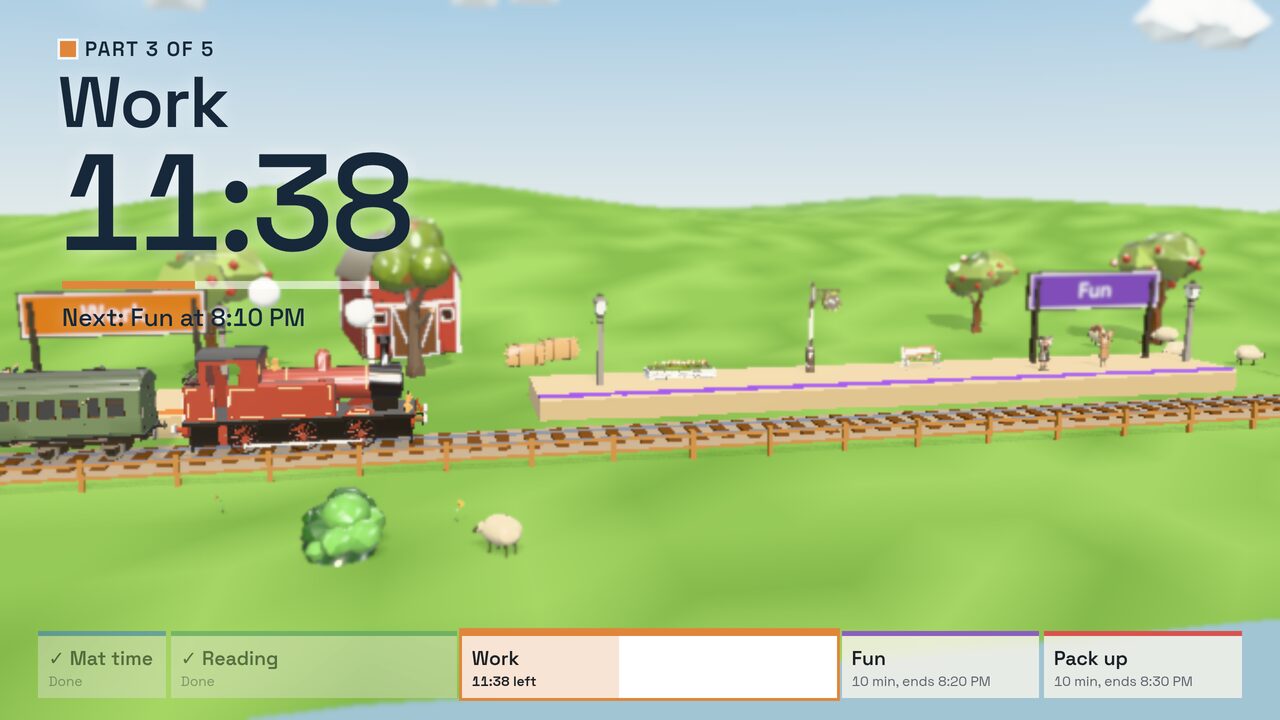
You write the lesson as a list of parts, for example 15 minutes reading, 20 minutes work, 10 minutes fun and 10 minutes pack up. The board shows the part the class is on in large letters, the time left in that part, and what comes next and when.
Along the bottom is a strip with every part in its own colour. Finished parts are ticked, the part they're on is white, and each part still to come shows when it ends by the clock.
Behind it all a steam train runs along a country line. Each part ends at a station with that part's name on the board, so the class can watch the train get closer to "Pack up". When it pulls in, it whistles and a card shows the new part. At the end of the lesson the train stops at the buffers and the people on the platform wave.
How it works
- Pick a ready-made plan or type your own parts. Click a colour to change it, and use the arrows to put the parts in order.
- Press Start the lesson. Space pauses. The arrow keys move on to the next part early or go back to the last one, and +1 and −1 add or take off a minute from the part you're on.
- If you'd rather move on yourself, tick Wait for me between parts. The train then stops at each station until you press Start.
Your plan is kept in the browser, so it's there next lesson. The timer follows the computer's clock, so it stays right on a slow laptop or when you switch to another tab.
Good for
- A whole lesson with a set routine
- Group rotations, with a part for each group
- Showing the class how long until break or pack up